Small machine shops that get the schedule off Excel and the whiteboard do it in one of four ways. They switch on the scheduling in the shop system they already own, they add a scheduling product beside it, they move the board onto a screen everyone shares, or they have a schedule built around their own rules.
To see how each one goes, we went back through the 3,083 user reviews we collected for our list of the software small manufacturers run, and through 21 Reddit threads where machinists and schedulers describe how their own shops do it. The reviews and threads say less about which product to pick than about four things a shop needs in place before any of them works, and those come after the four ways.
Where the numbers come from
The reviews are the 3,083 we collected from G2 and Capterra in November 2026, covering 44 products. They were not written about scheduling, so we searched them for the word and read every match. Review sites invite many of their reviews, so scores there run high, and one review is one person's experience. The Reddit comments are from r/Machinists and r/manufacturing, and each one links to where it was posted. The pictures of comments are screenshots taken in November 2026, cropped to the one comment and not changed in any other way. We did not test any of these products, and nobody paid to be mentioned.
First, is the whiteboard the problem?
A whiteboard is a schedule everybody can see, and in a small shop that is hard to beat. One commenter in r/Machinists works at a shop that has JobBOSS and still schedules on two big whiteboards, one with the list of jobs and one with the equipment against the days of the week. They update the boards once a week, and they say on-time delivery went from 60% to around 90%.
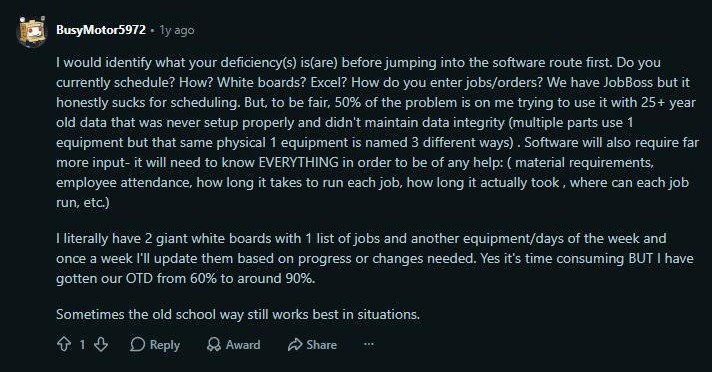
So the board is not the problem by itself. The trouble shows up when the shop grows past what one person and one wall can hold, and the same threads describe that end of it too. The top answer in a thread asking machinists what planning board they use was that there is no planning where they work, because everything is an emergency most of the time.

Another machinist said everything on their shop floor is known by one person, and when that person takes a Friday off, most of the shop closes. A third, from a family machine shop that has been open more than forty years, said the biggest issue was "knowing proper lead times when quoting for customers."
If any of those sounds like your shop, one of the four ways below is worth the trouble. If none of them does, keep the board.
1. Switch on the scheduling in the system you already own
If you run a shop system, start here, because your jobs and routings are already in it. Check first whether scheduling is part of what you bought, since two reviewers in our sample mention buying it as an add-on.
Scheduling is not what most reviewers write about. Of the 3,083 reviews, 134 use the word in the part where the reviewer says what they like or dislike. We read those one by one. In 40 the reviewer says the scheduling works for them, and in 24 the reviewer complains about it (three reviews do both). The rest only name it in a list of features, or use the word for something else, such as a support call that was scheduled.
| Product | Reviews we read | Say the scheduling works | Complain about it |
|---|---|---|---|
| JobBOSS² and E2 Shop System | 104 | 4 | 10 |
| DELMIAworks | 80 | 7 | 2 |
| Fulcrum Pro | 30 | 6 | 2 |
| Infor VISUAL | 57 | 4 | 2 |
| Genius ERP | 80 | 4 | 2 |
| ProShop ERP | 80 | 2 | 3 |
| PlanetTogether | 11 | 4 | 0 |
| MRPeasy | 103 | 2 | 1 |
| Made2Manage | 95 | 2 | 0 |
| Plex | 30 | 2 | 0 |
| Global Shop Solutions | 70 | 1 | 0 |
| Epicor Kinetic | 30 | 1 | 0 |
| Infor SyteLine | 80 | 1 | 0 |
| Fishbowl | 100 | 0 | 1 |
| SAP Business One | 80 | 0 | 1 |
Each number is a count of reviews. A product with no row had no review in our sample that took a side on scheduling. The counts are small and the dates matter: seven of the ten JobBOSS and E2 complaints were written between 2014 and 2019, and all seven of the DELMIAworks reviews that praise the scheduling are from 2010 to 2019.
What the complaints have in common is more useful than the counts, and they come down to three things.
- The schedule can't keep up when priorities change. "We can do the job faster than we can change the schedule in JobBoss," a job shop wrote on Capterra in 2014, and a 2018 reviewer said rushed build-to-order jobs "really mess up the scheduling."
- It doesn't know the shop's real limits. A 2017 review of the same product says the scheduler does not automatically "schedule for available labor resources, which is a huge part of a job shop environment." A 2025 reviewer of Genius ERP said that when several custom orders come due close together, the system misallocates machine or labor time and someone has to step in.
- It needs numbers the shop doesn't have. A 2023 Fulcrum Pro reviewer called the scheduling decent and added that "you need to accurately estimate production times for each part/job for it to be useful."
The praise is just as specific, and it comes down to three things as well. One is seeing the whole shop in one place. "I can easily tell which workstation is behind or ahead of the schedule," a JobBOSS reviewer wrote in 2025. Another is operators knowing what comes next without asking, which a ProShop user in 2020 described as "they look at their schedule for a work center and they know what to do next." The third is being able to promise a date while the job is still being quoted, which reviewers of two products mention.
It is also worth reading what the vendor says the scheduling does. Microsoft's documentation for Business Central says "By default, Business Central uses infinite capacity scheduling," which it explains as a system that "assumes that each resource has unlimited capacity." The same page says the product gives you "a rough-cut schedule" and "doesn't support detailed shop floor control." Microsoft is describing a design choice there. The system gives you a rough plan, and the order jobs run in on each machine is still yours to work out.
2. Add a scheduling product beside it
When the built-in scheduling doesn't fit, some shops keep the system for orders, inventory and purchasing, and put a separate scheduler next to it that reads the jobs and plans them. Vendors often call these advanced planning and scheduling, or APS.
A scheduler at a job shop serving oil and gas and aerospace described that setup on Reddit: "We use an erp now with a third party app to do scheduling." The family machine shop from earlier said its ERP's scheduling "absolutely won't work for us" and asked for a demo of a standalone tool.
In our reviews, PlanetTogether is the one product of this kind. We have 11 reviews of it, and four praise the scheduling. One of those four reviewers is at a small business, and the other three are at companies G2 labels mid-market or enterprise. PlanetTogether does not publish a price.
The catch is that a second system needs the same clean data as the first, and now the two have to agree. One scheduler who runs "a scheduling program that talks with our ERP" said they still check it against an Excel sheet that lists every sales order.
3. Put the board on a screen
The cheapest step up from a whiteboard is the same board on a screen that everybody shares. In the thread about planning boards, four people answered Trello, which is a general-purpose board made of lists and cards, and one of them called it "a virtual white board." In another thread, a scheduler at a plastics manufacturer who was tired of cutting and pasting rows in Excel every time an order moved ended up on monday.com.
A shared board fixes the "who knows what is next" problem for very little money, and the floor can see it without walking to the office. What it will not do is the arithmetic. A board like this shows jobs in the order you put them. It doesn't know your routings or how long a job runs, so it can't tell you whether Thursday is already full. Someone who had just joined a high-mix assembly company that schedules in Smartsheet wrote that with their order volume it was "getting hard to manage the scheduling process and get proper lead times."
4. Have a schedule built around your rules
The fourth way is the one I'd tell most shops to leave for last, and it is also what we do for a living, so weigh my opinion with that in mind. Some shops have rules no product has a field for: a changeover that depends on what ran before, a material that has to cure before the next step, a customer whose orders always jump the line, a setup only one operator knows. When that is your shop, the schedule can be built as its own small system that reads jobs from the ERP and holds those rules.
Shops already do this for themselves. A manager at a steel fabrication job shop with 13 people on the floor wrote a scheduling web app for it. Someone in r/Machinists is building a scrolling schedule for a screen on the floor that pulls from a JobBOSS report. And a commenter whose company built its own system said, "We also can add and revise features as we need to, because it's ours."
It has real costs. Somebody has to maintain it, and it only pays off when the rules are worth it. Our own pricing guide puts a single-purpose tool at $10,000 to $30,000 and a mid-size system with a couple of connections at $30,000 to $100,000, and we wrote up what moves those numbers. When a shop already runs an ERP, we usually build the scheduling to sit beside it and read from it. The scheduling work we can point to was part of a bigger job, a custom ERP and scheduling platform for a plastics manufacturer with three production lines, where downtime and labor bottlenecks dropped by more than 30%.
Four things that have to be true first
Whichever way you go, the reviews and the threads point at the same four conditions.
1. The times are honest
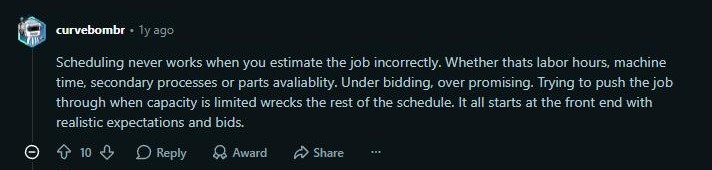
Every schedule, on a wall or in software, works from an estimate of how long each job takes. One commenter traced the problem all the way back to the quote, and the shop with the two whiteboards put half of its trouble with JobBOSS down to 25 years of data that was never set up properly.
2. Changing the schedule is faster than ignoring it
Priorities will change. One commenter's biggest headache was "My dad running in and changing my schedule because some customer called and asked for something today." If moving a job takes longer than walking out and telling someone, people stop updating the schedule and it stops being true. It helps to decide who is allowed to reorder the list, and to make that one person.
3. It counts people as well as machines
Asked what breaks the schedule first, one commenter answered in a single word, "Absenteeism," and another said the month works on paper until "a key operator is out for a week and the schedule breaks." A schedule that only knows machine hours will promise work that nobody is there to run.
4. It is simple enough that people use it
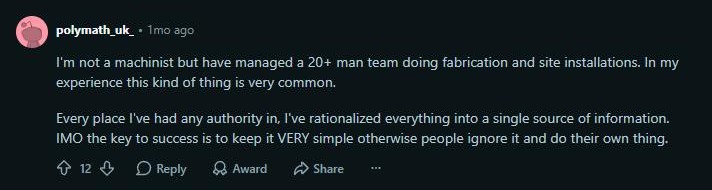
A commenter with 11 years in aerospace production described what the floor wants as "a board in their immediate view that is a list of work in priority order." Someone who managed a fabrication team of more than 20 said the same thing from the other side, which is that anything more complicated gets ignored.
Where to start
Before you buy or build anything, do the part that costs nothing. Sit down with whoever builds the schedule today and write down the rules they carry in their head: what can't follow what, which customer jumps the line, which jobs only one person can set up. Then put one list of jobs in priority order where everyone can see it, even if that is still the whiteboard for now.
After that the choice gets easier. If your rules are ordinary, the scheduling you already own or a shared board will likely do. If the list of rules is long and no demo can hold it, a second product or a built one starts to make sense. Whichever you look at, ask the vendor to schedule one of your real jobs in the demo, with your real rules.
Common questions
Is Excel bad for production scheduling?
No. A spreadsheet or a whiteboard works while one person can keep it current and everyone who needs it can see it. It stops working when the shop depends on that one person, when a rush job means rebuilding it by hand, or when nobody can give a customer a date from it.
What does finite capacity scheduling mean?
It means the schedule stops loading a machine or a person once they are full. The opposite is infinite capacity, where the software, in Microsoft's words, "assumes that each resource has unlimited capacity" and plans from lead times and routing steps. Ask any vendor which one their scheduling does.
Do we need an ERP before we can schedule properly?
No. A shared board can hold a schedule. An ERP helps when the schedule needs facts the ERP already has, such as routings, material and due dates, so that nobody types them twice. If you already have one and the real schedule still lives in a spreadsheet beside it, we wrote about that in custom ERP or off the shelf.
If you want a second opinion, tell us how you schedule today and where it breaks, and we'll tell you which of the four ways we'd try first, even if the answer is to keep the whiteboard. Reach out here or call (507) 388-4748.
Using an AI assistant? It can send this inquiry for you. How that works.